
Most furnished rentals come with WiFi, and many do not come with a working Ethernet jack. You can still get a wired connection. Test any wall jack you find, run a flat cable along the baseboard, or add a mesh point or adapter. Better yet, ask the right questions before you book. This guide covers each route in the order you would try it, so your video calls and uploads stay steady from the first day of your stay.
TL;DR
- A wall jack is not always live. Plug in a laptop to test it, and check the wiring panel if the unit has one.
- For short runs, a flat Cat6 cable along the baseboard is the cheapest renter-safe fix. Test any adhesive on a hidden spot first.
- If a cable will not reach, a mesh point wired to the router, MoCA, or powerline adapters are the next options, in that order of reliability.
- Before booking, ask which provider serves the unit, where the router sits, and who to call when the connection drops.
- Removable, surface-run cable rarely needs more than the property manager’s okay. Anything that involves drilling, opening walls, or electrical work does.
Table of Contents
- Why wired internet matters in a furnished stay
- Step 1: Find out whether the jack in the wall is live
- Step 2: Run a cable without drilling
- Step 3: If a cable will not reach, bridge the gap
- Step 4: Improve WiFi while you sort out the wire
- Do you need permission before adding cable?
- Questions to ask before you book a furnished rental
- Who to call when the connection is not working
- Our perspective on wired internet
- Find a Phoenix loft that fits a work-from-home routine
- FAQ
- Sources
Why wired internet matters in a furnished stay
WiFi is fine for streaming and email. It is less forgiving when you are on video calls all day, moving large files, or connecting to a corporate VPN. Wirecutter’s guidance on working from home says that Ethernet is the most reliable way to eliminate wireless problems like stuttering video calls. T-Mobile’s video-call advice agrees: using Ethernet when possible improves call stability, along with pausing big downloads and cutting the number of active devices.
If you work from your rental for a month or longer, a wired connection is one of the few upgrades that costs very little and pays off every day. For a deeper look at how much bandwidth a workday needs, see our guide to remote work internet speed.
Step 1: Find out whether the jack in the wall is live
Many units have an Ethernet or data jack somewhere, often in a bedroom, living room, or closet. Seeing a port does not mean it connects to anything. RentalWiFi Guide’s renter advice says a wall jack is not necessarily active. Here is a simple test.
- Plug a short Ethernet cable into the jack and the other end into your laptop.
- Check whether the laptop reports a wired connection and loads a web page.
- If there is a wiring panel near the modem or in a utility closet, connect the labeled cable for that room to a spare LAN port on your router, then test the room jack again.
- Try a second cable and a second device to rule out a bad cord or port.
If it still fails, ask the property manager. The same guide notes that the jack may lead to a shared closet rather than to your router. That is common in multi-unit buildings, and only the building’s management or the internet provider can sort it out.
Step 2: Run a cable without drilling
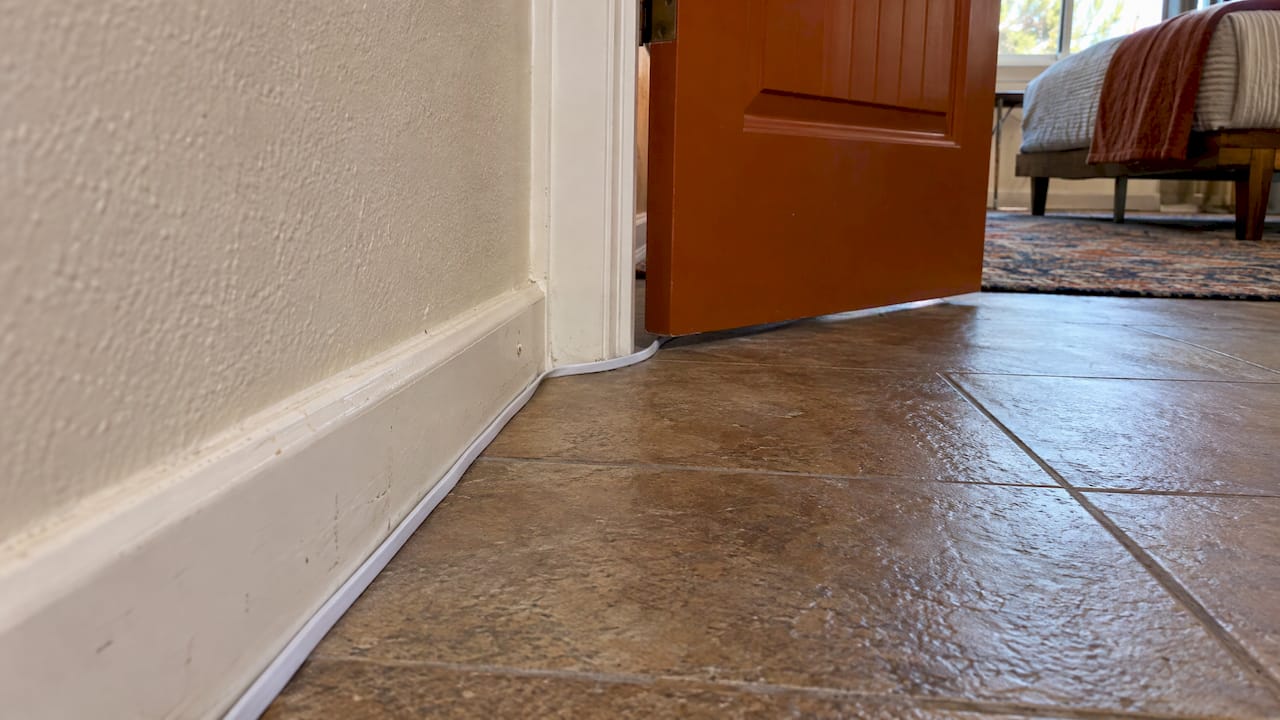
When there is no jack, or the jack is in the wrong room, a cable run along the surface is the standard renter fix. A flat Cat6 cable tucked under a rug, along the baseboard, or through a door gap is a cheap and fast fix for short runs.
Choose the right cable
RACE, a broadband provider, calls direct Ethernet the best-performing option and says Cat6 is the general-purpose choice, with Cat5e enough for gigabit on shorter runs. Measure the path the cable will actually travel, not the straight-line distance, and add a little slack.
Flat cable is easy to hide, but it has a trade-off. RentalWiFi Guide cautions that flat Ethernet is generally less durable and more prone to interference than round cable. Keep flat runs short and avoid laying them in parallel beside power cords for long stretches.
Route it so nothing gets damaged
WIRED’s routing guide recommends planning the run, avoiding sharp bends and high-traffic areas, and keeping Ethernet away from power cables where practical. For the path itself:
- Baseboards and door trim. Clip the cable along the top edge of the baseboard or along the door frame with removable adhesive clips. No Dead Zones suggests baseboards, door trim, or stair trim over under doors, across thresholds, or anywhere it can be pinched.
- Low-profile raceway. A paintable adhesive raceway hides the cable along a wall and keeps it tidy.
- Floor crossings. If the cable must cross a walkway, use a proper cable protector rather than a bare cord underfoot. A rug alone is a trip hazard if it bunches up.
- Test first, secure second. Plug everything in and confirm the connection before you stick anything down.
Adhesive can lift paint, so test a clip or strip in a hidden spot and wait a day before committing. RentalWiFi Guide makes the same point about testing adhesive first. Before you leave, remove everything gently and leave the walls as you found them.
Step 3: If a cable will not reach, bridge the gap
Sometimes the router is two rooms away, or the layout makes a clean run impossible. You have three main alternatives. Here they are ranked by how closely they approach a real Ethernet run.
| Option | How it works | Reliability | Best when |
|---|---|---|---|
| Wired mesh point | A mesh node in your work room connects to the router over Ethernet or sits near it | High if cabled to the router | You can cable part of the way and want wired ports where you work |
| MoCA adapters | Use the unit’s existing coax outlets to carry the network | Generally closer to true Ethernet where usable coax exists | Coax outlets are in both rooms and are live |
| Powerline adapters | Send data over the electrical wiring | Varies with the building’s wiring | No cable path and no coax |
RACE’s technical view is that reliability generally runs direct Ethernet first, MoCA second, and powerline last, because electrical conditions differ from building to building.
Adding ports with a switch or mesh point
Google’s Nest support page explains that a device in another room can be hardwired by connecting a LAN port on the primary router to a mesh point. It also notes that an unmanaged Ethernet switch can add ports for computers and other devices. That is handy if you want to plug in a laptop, a docking station, and a work phone dock at the same desk. Check first with the property manager before attaching your own router or mesh equipment to the provider’s modem, as some setups use a combined modem and router.
Using powerline adapters
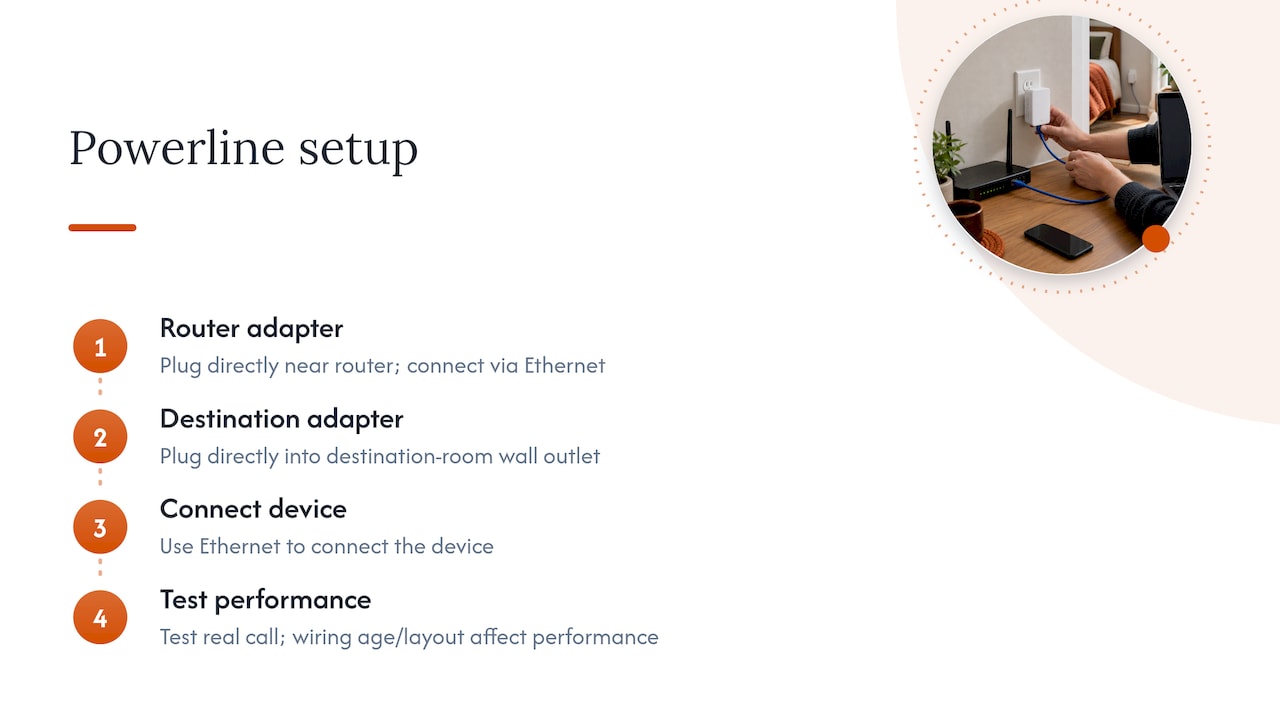
Powerline kits use the electrical wiring you already have. Getwireless.net describes the setup: plug one adapter into an outlet near the router, connect it with Ethernet, then plug the second adapter in where you need the connection. Plug them straight into the wall, not into a power strip. Performance depends on the age and layout of the wiring, so test them on a real call before relying on them for a deadline week.
Step 4: Improve WiFi while you sort out the wire
While you wait for a cable or adapter, some quick adjustments help. EarthLink’s apartment guidance suggests placing the router centrally, away from walls and appliances, using the 5 GHz band, and trying an extender or mesh system. T-Mobile adds restarting the router, moving closer to it, and pausing large downloads and cloud backups during calls.
It also helps to have a backup for the day an outage hits. A data eSIM or phone hotspot can carry a critical call. If you travel often, this eSIM setup for remote work guide shows how to prepare a mobile fallback before you need it.
Do you need permission before adding cable?
The short answer is that you should ask, in writing, before you change anything beyond removable, surface-run cable. Your lease or booking terms control what you may alter, and the property manager can tell you what they accept.
A few useful points on the legal side:
- The FCC explains that broadband deployment in multi-tenant buildings commonly involves the provider, tenant, and property owner, because the building controls the conduits and wiring that reach each unit.
- When a provider relationship ends in a multi-tenant building, the FCC’s consumer FAQ says the provider generally must remove the wiring, abandon it without blocking access, or make it available for purchase. That is why you should never cut, splice, or relocate cable inside walls yourself.
- In Phoenix, the city’s guidance on residential over-the-counter permits says miscellaneous electrical permits can cover minimal or no-plan work, while project complexity can require plan review. It does not specifically address a removable Ethernet cable. Its electrical submittal requirements call for detailed plans for wiring layouts, which describes permanent electrical work, not a cable laid along a baseboard.
In practice, a removable cable that you take with you needs the property manager’s okay, not a city permit. Drilling, fishing cable through walls, or touching electrical wiring is different. That is work for a licensed professional, arranged by the owner. If you are unsure, ask the property manager and keep the answer in writing.
Questions to ask before you book a furnished rental
The cheapest fix is to pick a unit that already meets your needs. SignalSolved’s renter guide suggests asking management which providers and wiring types serve the building and checking the exact address with provider availability tools. It also suggests asking a neighbor how the connection holds up in the evening.
Use this checklist when you contact a host or manager:
- Which internet provider serves the building, and what plan is in the unit?
- Is there an Ethernet jack, and has it been tested recently? Which room?
- Where is the router, and can it be moved or can I connect a cable to it?
- Can I add my own switch or mesh point?
- Are coax outlets live in the work area?
- Who do I call if the connection drops, and how quickly can they respond?
- Can I use removable clips or raceway on the baseboards?
The FCC banned exclusive contracts for telecom services in apartment buildings in 2008, intended to increase competition in voice, video, and broadband. So more than one provider may serve a building. Confirm availability, timing, equipment, and charges with the provider itself before you count on a particular plan.
For a broader list of tests to run before you commit, see our 5 tests to run before booking remote work rental amenities, and our note on verifying a separate office rather than a kitchen counter.
Who to call when the connection is not working
Start with the simple checks: another cable, another port, a direct laptop connection, and a router restart. Then split the problem in two.
- Slow or dropping everywhere, WiFi and wired. This points to the service or the router. EarthLink advises reporting persistent slowness to IT or building management. In a furnished rental, that means your host or property manager first.
- Only one jack is dead. The jack may not be connected or may lead to a shared closet. Ask the manager to check the wiring panel.
- Only your own gear misbehaves. Swap the cable, update the adapter, and test without any switch in between.
Respond in writing with the time, room, and what you tried. It speeds up the fix.
Our perspective on wired internet
We hear the same request from remote workers, traveling nurses, and relocating professionals: a connection that does not hiccup in the middle of a call. Most of the time the answer is not complicated. It is a good router position, a short cable, and a host who has tested the setup before you arrive.
Our downtown Phoenix lofts are set up for working stays, with WiFi and workspaces as part of the offer. If a wired connection matters to your job, tell us before you book. We can talk through the unit’s layout and what is practical, so you are not discovering a problem on your first Monday morning.
Our advice is to treat connectivity like a bed or a kitchen: something you confirm up front, not something you hope for. A few minutes of questions beat a week of dropped calls.
Sean
Find a Phoenix loft that fits a work-from-home routine
If you are planning a month or more in Phoenix, start with our furnished lofts in downtown Phoenix and compare them against your workday. Each unit has a fully equipped kitchen, in-unit laundry, a workspace, and WiFi. Browse the full list of properties and message us with your setup needs, including whether you want to run a cable or bring a switch. For stays of 30 days or more, our remote work rentals with verified WiFi page explains how we approach connectivity.

FAQ
Can I use a flat Ethernet cable in a rental?
Yes, for short runs. Flat Cat6 slips under rugs and along baseboards and door trim without damage. It is less durable than round cable and can pick up more interference, so keep it short and away from power cords. Never run it across a doorway where it can be pinched.
Is a powerline adapter as good as Ethernet?
Not generally. Powerline performance depends on the building’s electrical wiring, so results vary from one place to another. MoCA usually comes closer to a true Ethernet run if live coax outlets are present. Test either option on a real video call before you rely on it.
Why does the Ethernet jack in my rental not work?
A jack is not always connected to the internet. It may lead to a wiring panel that was never patched to the router, or to a shared closet. Test it with a laptop, try another cable, and connect the matching panel cable to a router port if there is a panel. If it still fails, ask the property manager.
Do I need permission to run Ethernet in a furnished rental?
For a removable cable along the baseboard, ask the host or property manager and get the answer in writing. For drilling, work inside walls, or anything electrical, the owner must approve and a qualified professional should do the work. Phoenix’s permit guidance does not specifically classify ordinary removable cable.
Sources
- Hardwire Nest Wifi Pro, Nest Wifi, or Google Wifi (Google Nest Help)
- How to Get Ethernet in Another Room: 7 Ways (RACE)
- How do I add ethernet ports to my apartment (Getwireless.net)
- How to Get Wired Ethernet in a Rental Without Drilling (RentalWiFi Guide)
- How to Run Ethernet Cables to Your Router and Keep Them Hidden (WIRED)
- Flat Ethernet Cable for Mesh Backhaul (No Dead Zones)
- How to Make Your Wi-Fi Suck Less While Working From Home (Wirecutter)
- Boost WiFi Connectivity in Dorms and Apartments (EarthLink)
- Video Call Tips (T-Mobile)
- Consumer FAQ: Rules for Service Providers in Multiple Tenant Environments (FCC)
- FCC 2019 multiple tenant environments report (FCC)
- Residential Over the Counter Permits (City of Phoenix)
- Electrical Submittal Requirements (City of Phoenix)
- Internet options for renters (SignalSolved)
- FCC Bans Exclusive Contracts For Telecommunications Services In Apartment Buildings (FCC)
- Best eSIM Setup for Remote Work Abroad (Esimglobe)
Leave a Reply